
Running a small business often means doing many different jobs at the same time.
You might be the owner, marketer, customer support person, salesperson, accountant, content creator, and manager all in the same day.
This is where artificial intelligence can help.
Modern AI tools can help small businesses write emails, create marketing content, design social media posts, answer customer questions, automate repetitive tasks, organize meetings, manage documents, and analyze information.
The important thing is not to use AI everywhere.
The goal is to find specific tasks that take too much time and use AI to make them faster and easier.
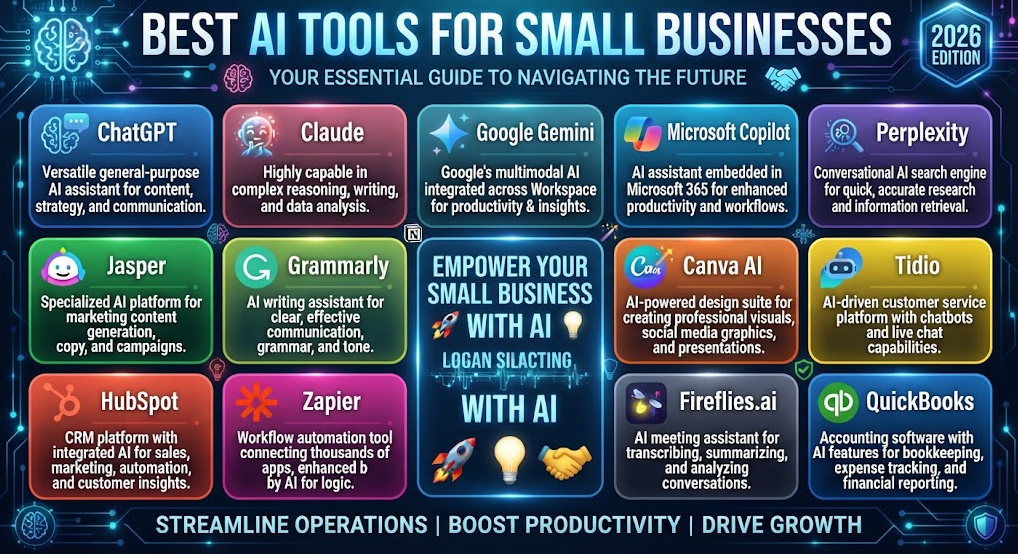
In this guide, we’ll look at the best AI tools for small businesses in 2026, what each tool is useful for, and how to choose the right AI tools without wasting money on unnecessary subscriptions.
Note: AI features, plans, limits, and pricing can change frequently. Check the official website of each tool before making a purchasing decision.
Best AI Tools for Small Businesses Quick Comparison
| AI Tool | Best For | Marketing | Automation | Customer Support | Beginner Friendly |
|---|---|---|---|---|---|
| ChatGPT | General business tasks | ⭐⭐⭐⭐⭐ | ⭐⭐⭐⭐ | ⭐⭐⭐⭐ | ⭐⭐⭐⭐⭐ |
| Claude | Writing and business analysis | ⭐⭐⭐⭐ | ⭐⭐⭐ | ⭐⭐⭐⭐ | ⭐⭐⭐⭐⭐ |
| Google Gemini | Google Workspace users | ⭐⭐⭐⭐ | ⭐⭐⭐⭐ | ⭐⭐⭐ | ⭐⭐⭐⭐⭐ |
| Microsoft Copilot | Microsoft 365 businesses | ⭐⭐⭐⭐ | ⭐⭐⭐⭐ | ⭐⭐⭐ | ⭐⭐⭐⭐⭐ |
| Canva AI | Marketing and design | ⭐⭐⭐⭐⭐ | ⭐⭐⭐ | ⭐⭐ | ⭐⭐⭐⭐⭐ |
| HubSpot AI | CRM and sales | ⭐⭐⭐⭐⭐ | ⭐⭐⭐⭐ | ⭐⭐⭐⭐⭐ | ⭐⭐⭐⭐ |
| Zapier | Workflow automation | ⭐⭐⭐⭐ | ⭐⭐⭐⭐⭐ | ⭐⭐⭐⭐ | ⭐⭐⭐⭐ |
| Notion AI | Business organization | ⭐⭐⭐ | ⭐⭐⭐⭐ | ⭐⭐⭐ | ⭐⭐⭐⭐ |
| Grammarly | Business writing | ⭐⭐⭐⭐ | ⭐⭐ | ⭐⭐⭐ | ⭐⭐⭐⭐⭐ |
| Fireflies.ai | Meetings | ⭐⭐⭐ | ⭐⭐⭐⭐ | ⭐⭐ | ⭐⭐⭐⭐⭐ |
| QuickBooks | Accounting and bookkeeping | ⭐⭐ | ⭐⭐⭐⭐ | ⭐⭐ | ⭐⭐⭐⭐ |
| Perplexity | Business research | ⭐⭐⭐⭐ | ⭐⭐ | ⭐⭐ | ⭐⭐⭐⭐⭐ |
| Tidio | Customer support | ⭐⭐⭐ | ⭐⭐⭐⭐ | ⭐⭐⭐⭐⭐ | ⭐⭐⭐⭐ |
| Jasper | Marketing content | ⭐⭐⭐⭐⭐ | ⭐⭐⭐ | ⭐⭐⭐ | ⭐⭐⭐⭐ |
What Can AI Do for a Small Business?
AI can help with many everyday business tasks.
For example, you can use AI to:
- Write emails
- Create social media posts
- Generate marketing ideas
- Write product descriptions
- Create advertisements
- Design graphics
- Answer common customer questions
- Summarize meetings
- Organize business information
- Automate repetitive tasks
- Research competitors
- Analyze documents
- Create reports
- Write proposals
- Improve website content
- Generate business ideas
- Create customer follow-ups
- Help with bookkeeping workflows
- Analyze spreadsheets
The best results usually come from connecting AI to an existing business workflow.
For example:
Customer inquiry → AI response → CRM → Follow-up → Sales
or:
New order → Automation → Invoice → Customer email → Accounting
1. ChatGPT
Best for: General business assistance
ChatGPT is one of the most useful general-purpose AI tools for small business owners.
You can use it for:
- Emails
- Marketing ideas
- Business planning
- Product descriptions
- Customer replies
- Blog posts
- Social media content
- Research
- Data analysis
- Brainstorming
- Business documents
For example, you could ask:
“Write a friendly response to a customer asking about delivery times. Keep it professional and under 100 words.”
You can also use it as a brainstorming partner.
For example:
“Give me 20 marketing ideas for a small local bakery with a limited advertising budget.”
This makes a general AI assistant useful even when you don’t have a dedicated marketing team.
2. Claude
Best for: Long documents and business writing
Claude can be useful for businesses that frequently work with large documents, reports, proposals, policies, and other text-heavy material.
You can use it to:
- Summarize documents
- Review proposals
- Improve business writing
- Analyze reports
- Create policies
- Draft emails
- Brainstorm strategies
For example:
“Review this business proposal and identify unclear sections, missing information, and areas that could be more persuasive.”
Claude can also help turn complicated information into simpler explanations.
3. Google Gemini
Best for: Businesses using Google Workspace
Google Gemini can be useful if your business already relies heavily on Google’s ecosystem.
Small businesses may use Google tools for:
- Gmail
- Google Docs
- Google Sheets
- Google Drive
- Google Meet
- Calendar
AI assistance within a familiar ecosystem can reduce the need to move information between multiple applications.
For example, AI can help with writing emails, working with documents, summarizing information, and analyzing business data.
4. Microsoft Copilot
Best for: Microsoft 365 businesses
If your business uses Microsoft 365, Copilot can be a natural option.
Businesses can use AI assistance for tasks involving:
- Word
- Excel
- Outlook
- PowerPoint
- Teams
- Business documents
For example, a business owner could use AI to help summarize a long email conversation or create a presentation from existing business information.
5. Canva AI
Best for: Marketing and graphic design
Small businesses often need visual content but cannot afford a full-time designer.
Canva can help create:
- Social media posts
- Posters
- Flyers
- Presentations
- Advertisements
- YouTube thumbnails
- Business documents
- Marketing graphics
Its AI features can make creating visual content easier for people without professional design experience.
For a small business, Canva can be particularly useful for maintaining a consistent visual identity across social media and marketing materials.
6. HubSpot AI
Best for: CRM, sales, and customer management
HubSpot is useful for businesses that need to manage customer relationships and sales activities.
Its AI capabilities can assist with:
- Customer information
- Sales activities
- Marketing
- Customer service
- Lead management
- Content creation
Instead of keeping customer information scattered across spreadsheets, email conversations, and notes, a CRM can provide a central place to manage customer interactions.
AI can then help automate parts of that workflow.
7. Zapier
Best for: Business automation
Zapier is one of the most useful tools for connecting different applications.
For example, you could create a workflow like:
Website form → Google Sheets → Email notification → CRM
Or:
New customer → CRM → Welcome email → Task creation
AI can make these workflows more flexible by helping classify information, generate responses, or make decisions within an automation.
Automation is especially useful for small businesses because repetitive administrative tasks can consume a surprising amount of time.
8. Notion AI
Best for: Business organization and internal knowledge
Notion can be used to organize:
- Projects
- Company information
- Meeting notes
- Tasks
- Documentation
- Procedures
- Business plans
AI features can help summarize notes, rewrite information, generate content, and search through business knowledge.
For example:
“Summarize the decisions made during this meeting and create three follow-up tasks.”
This can make Notion useful as a shared business knowledge base.
9. Grammarly
Best for: Professional business communication
Small businesses communicate with customers every day.
Grammarly can help improve:
- Emails
- Website copy
- Proposals
- Social media posts
- Marketing messages
- Business documents
It can help identify grammar problems and improve clarity and tone.
This is particularly useful when English is not your first language or when you want customer communication to sound more professional.
10. Fireflies.ai
Best for: Meeting notes and transcription
Meetings can create a lot of information that is easy to forget.
Fireflies.ai can help record, transcribe, summarize, and organize meeting conversations.
Instead of manually writing notes, you can use AI to produce a summary and identify important action items.
For example:
Meeting → Transcript → Summary → Action items → Follow-up
This can save time for small teams that have frequent online meetings.
11. QuickBooks
Best for: Accounting and bookkeeping workflows
Accounting is another area where AI can assist small businesses.
QuickBooks offers accounting tools with AI-powered capabilities that can help with tasks such as:
- Financial organization
- Transaction categorization
- Bookkeeping workflows
- Reports
- Business insights
AI should not replace professional accounting advice for complicated financial or tax decisions.
However, it can reduce some repetitive administrative work.
12. Perplexity
Best for: Business research
Small businesses often need to research:
- Competitors
- Products
- Markets
- Industries
- Customer trends
- Business ideas
- Technology
Perplexity can be useful when researching topics and looking for sourced information.
For example:
“Research the current market for electric vehicle charging services in my target region and identify the major competitors.”
Always verify important business information before making financial or strategic decisions.
13. Tidio
Best for: Customer support and website chat
Customer questions can consume a large amount of time.
Tidio provides tools for website chat and customer support, including AI-powered customer interactions.
Businesses can use customer-service automation for common questions such as:
- Opening hours
- Shipping information
- Return policies
- Product information
- Appointment questions
- Basic support
A good approach is to let AI handle repetitive questions while sending complex issues to a human.
14. Jasper
Best for: Marketing content
Jasper focuses heavily on marketing and content creation.
It can help businesses create:
- Marketing copy
- Campaign ideas
- Website content
- Social media content
- Advertising copy
- Brand-focused content
It can be more useful for businesses that produce marketing content regularly rather than someone who only needs occasional AI writing.
Best AI Tools for Small Businesses by Task
| Business Task | Recommended Tools |
|---|---|
| General business work | ChatGPT, Claude |
| Business research | Perplexity, ChatGPT |
| Email writing | ChatGPT, Grammarly, Gemini |
| Social media | Canva, ChatGPT, Jasper |
| Graphic design | Canva |
| Marketing content | ChatGPT, Jasper |
| Customer support | HubSpot, Tidio |
| CRM and sales | HubSpot |
| Workflow automation | Zapier |
| Meeting notes | Fireflies.ai |
| Business organization | Notion AI |
| Accounting | QuickBooks |
| Microsoft 365 work | Microsoft Copilot |
| Google Workspace work | Google Gemini |
| Product descriptions | ChatGPT, Jasper |
| Business documents | Claude, ChatGPT |
| Presentations | Canva, Copilot, Gemini |
Best AI Stack for a Small Business
You don’t need 15 different AI subscriptions.
In fact, starting with too many tools can make your business more complicated.
A simple AI stack could look like this:
Small Business Starter Stack
ChatGPT
For general business tasks.
Canva
For graphics and marketing.
Zapier
For automation.
That’s already enough to automate or improve many everyday workflows.
Growing Business Stack
For a growing company, you could add:
HubSpot → CRM and customer management
Notion AI → Internal knowledge and organization
Fireflies.ai → Meeting notes
QuickBooks → Accounting
This gives you tools for several important business functions without trying to automate everything.
How AI Can Save Time
Imagine a small business receives 30 customer inquiries every day.
Without automation, someone may need to:
- Read each message
- Identify the question
- Find the relevant information
- Write a response
- Send the response
- Create a follow-up task
AI and automation can potentially reduce this to:
Customer message → AI identifies request → Information retrieved → Draft response → Human approval
The human can then handle the conversations that actually require personal attention.
The same principle applies to marketing, administration, meetings, and data processing.
AI for Small Business Marketing
Marketing is one of the easiest areas for a small business to start using AI.
AI can help create:
- Facebook posts
- Instagram captions
- Blog ideas
- Email newsletters
- Advertisements
- Product descriptions
- Video scripts
- Promotional messages
For example:
“Create five Facebook post ideas for a small coffee shop promoting a weekend special. Make each post friendly and natural.”
You can then edit the AI output to match your business voice.
The goal should not be to publish generic AI content everywhere.
Add:
- Real photos
- Customer stories
- Local information
- Your own experience
- Original offers
- Real business details
This makes the content more useful and authentic.
AI for Customer Service
Customer service is another strong use case.
AI can answer simple questions while employees focus on more complicated requests.
For example:
Customer: “What time do you close?”
AI: “We’re open until 8 PM today.”
But:
Customer: “My order arrived damaged. What should I do?”
This may need to be transferred to a human.
A good customer-support system should know when to stop automating and involve a person.
AI for Sales
AI can also help sales teams.
It can assist with:
- Lead research
- Customer follow-ups
- Email drafts
- Lead qualification
- CRM updates
- Proposal writing
- Sales summaries
For example:
“Create a short follow-up email for a potential customer who requested a quotation last week.”
This can save time while still allowing the salesperson to personalize the final message.
AI for Small Business Websites
AI can help improve your website by creating:
- Product descriptions
- FAQ pages
- Blog posts
- Landing page copy
- Service descriptions
- Email forms
- Chatbot responses
You can also use AI to identify unclear sections of a website.
For example:
“Review this service page from the perspective of a first-time customer. Identify anything that is confusing or missing.”
This can provide useful ideas for improving the customer experience.
AI for Business Data
Small businesses generate a lot of data.
Examples include:
- Sales
- Expenses
- Website traffic
- Customer information
- Orders
- Marketing performance
- Inventory
AI can help analyze spreadsheets and identify patterns.
For example:
“Analyze these monthly sales figures and identify the products with the highest growth and the months with the weakest sales.”
However, important financial decisions should be verified using the original data and appropriate professional advice.
Don’t Automate Everything
AI is powerful, but automation isn’t always better.
Some tasks need human involvement.
Be careful when automating:
- Important customer complaints
- Refund decisions
- Legal communication
- Financial decisions
- Hiring decisions
- Sensitive customer information
- Medical or safety-related communication
AI should support your employees rather than remove human judgment from every process.
Common AI Mistakes Small Businesses Should Avoid
1. Buying Too Many Tools
Don’t subscribe to ten AI platforms because they look interesting.
Start with one problem.
For example:
“Customer support takes too much time.”
Solve that problem first.
2. Publishing AI Content Without Editing
AI-generated content can sound generic.
Always review important customer-facing content.
3. Sharing Sensitive Information
Don’t casually upload:
- Passwords
- API keys
- Customer information
- Financial credentials
- Private business documents
Understand the privacy policies of the AI tools you use.
4. Trusting AI Completely
AI can make mistakes.
Verify important information, especially when it affects:
- Money
- Customers
- Legal matters
- Security
- Business decisions
5. Automating Bad Processes
AI cannot fix every inefficient workflow.
First understand the process.
Then improve it.
Then automate it.
How to Choose the Right AI Tool
Before paying for an AI tool, ask five questions:
1. What problem does it solve?
Don’t buy an AI tool simply because it is popular.
2. How much time can it save?
Estimate how many hours it could save each month.
3. Does it integrate with your existing tools?
Integration is often more important than having the most powerful AI model.
4. Can my employees use it easily?
A complicated tool that nobody uses provides little value.
5. Can I measure the result?
Look for measurable improvements such as:
- Less time spent
- Faster customer responses
- More leads
- Lower administrative workload
- Better marketing output
- Fewer repetitive tasks
A Simple AI Adoption Plan
You don’t need to transform your entire business overnight.
Try this approach.
Week 1: Find a Problem
Identify the task that wastes the most time.
Week 2: Choose One Tool
Test one AI solution.
Week 3: Create a Workflow
Turn the AI tool into part of your normal process.
Week 4: Measure the Result
Compare the time and effort before and after using AI.
If the result is useful, keep it.
If not, try something else.
Best AI Tools for Small Businesses — Quick Picks
| Business Need | Best Starting Tool |
|---|---|
| General business assistant | ChatGPT |
| Long documents and analysis | Claude |
| Google Workspace | Gemini |
| Microsoft 365 | Copilot |
| Graphic design | Canva |
| CRM and sales | HubSpot |
| Automation | Zapier |
| Business organization | Notion AI |
| Writing improvement | Grammarly |
| Meeting summaries | Fireflies.ai |
| Accounting | QuickBooks |
| Research | Perplexity |
| Website customer chat | Tidio |
| Marketing content | Jasper |
Final Thoughts
AI can give small businesses access to capabilities that previously required more employees, more software, or more time.
You can use AI to write content, design marketing materials, answer customer questions, organize meetings, automate workflows, research markets, manage documents, and support everyday business operations.
But you don’t need every AI tool available.
Start with the biggest problem in your business.
If writing takes too long, try ChatGPT or Claude.
If design is the problem, try Canva.
If repetitive tasks are wasting time, try Zapier.
If customer management is difficult, consider HubSpot.
If accounting takes too much administrative time, look at QuickBooks.
The best AI stack is not the one with the most tools.
It’s the one that saves your business real time, reduces repetitive work, and helps your team serve customers better.
Start small, measure the results, and add more AI only when it solves a real business problem.