
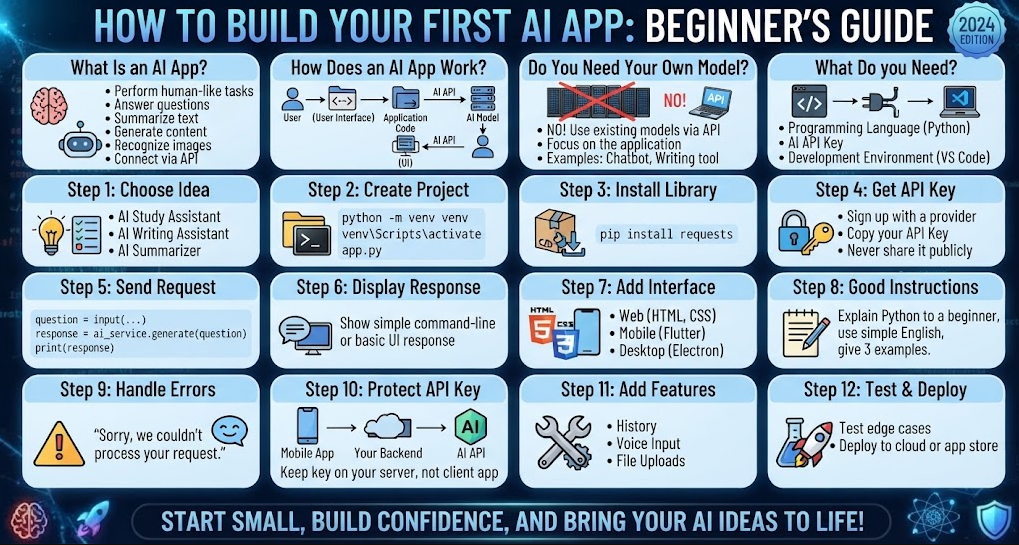
Building an AI app may sound complicated, especially if you are new to programming. But you do not need to build an AI model from scratch to create your first AI application.
Today, developers can connect existing AI models to websites, mobile apps, and desktop applications using APIs and programming languages such as Python, JavaScript, and Dart.
In this guide, you will learn what an AI app is, what you need to build one, how AI APIs work, and how to create a simple AI application step by step.
What Is an AI App?
An AI app is an application that uses artificial intelligence to perform a task that normally requires some level of human-like reasoning or language understanding.
For example, an AI app could:
- Answer questions
- Summarize text
- Generate content
- Translate languages
- Analyze documents
- Recognize images
- Generate images
- Recommend products
- Help users write code
- Create personalized learning experiences
A chatbot is one of the simplest examples of an AI application.
The important thing to understand is that your application does not necessarily need to contain the AI model itself. Your app can communicate with an AI service through an API.
How Does an AI App Work?
A simple AI application usually has three main parts:
- User interface – where the user enters information.
- Application code – sends the user’s request to an AI service.
- AI model – processes the request and returns a response.
The basic process looks like this:
User → Your App → AI API → AI Model → AI API → Your App → User
For example, imagine you create an AI writing assistant.
A user enters:
Write a short product description for a wireless headphone.
Your application sends that request to an AI model.
The model processes the request and returns text such as:
Enjoy clear, powerful sound wherever you go with these wireless headphones…
Your application then displays the response to the user.
Do You Need to Train Your Own AI Model?
For your first AI app, usually no.
Training a large AI model from scratch requires huge amounts of data, computing power, time, and technical knowledge.
Instead, beginners can use an existing AI model through an API.
This allows you to focus on building the application itself.
For example, you can build:
- AI chat applications
- AI writing tools
- AI study assistants
- AI document analyzers
- AI customer-support systems
- AI coding assistants
- AI content generators
without creating the underlying language model yourself.
What Do You Need to Build an AI App?
You only need a few basic things to get started.
1. A Programming Language
Popular choices include:
| Language | Good For |
|---|---|
| Python | AI projects, backend development and beginners |
| JavaScript | Web applications |
| TypeScript | Modern web applications |
| Dart | Flutter mobile applications |
| Java/Kotlin | Android applications |
| Swift | iPhone applications |
If you are completely new to programming, Python is a good place to start because its syntax is relatively easy to understand.
2. An AI API
An API allows your application to communicate with an AI model.
The API normally works through requests and responses.
Your application sends information such as:
"Explain machine learning in simple terms."
The AI service processes the request and returns a response.
3. A Development Environment
You can use an editor such as Visual Studio Code, PyCharm, Android Studio, or another development environment.
For a simple Python project, Visual Studio Code and Python are enough to get started.
Your First AI App: A Simple AI Assistant
Let’s imagine that we want to create a very simple AI assistant.
The application will:
- Ask the user for a question.
- Send the question to an AI API.
- Receive the AI response.
- Display the answer.
The basic logic looks like this:
Start
   ↓
Ask user for a question
   ↓
Send question to AI API
   ↓
AI processes the request
   ↓
Receive response
   ↓
Display response
   ↓
Ask another question
This simple structure can eventually become a much larger application.
Step 1: Choose Your AI App Idea
Before writing code, decide what your application will do.
Do not start with a huge project.
Instead, choose one simple problem.
For example:
AI Study Assistant
The user enters a topic and the application explains it.
AI Writing Assistant
The user enters an idea and the application creates a draft.
AI Summarizer
The user pastes a long article and the application creates a short summary.
AI Coding Helper
The user enters a programming problem and receives an explanation or example.
AI Translator
The user enters text and selects a target language.
A small first project is much easier to finish than a large application with dozens of features.
Step 2: Create Your Project
If you choose Python, create a new project folder.
For example:
my_first_ai_app/
    app.py
You can then create a Python virtual environment.
On Windows, you could use:
python -m venv venv
Activate it with:
venv\Scripts\activate
On macOS or Linux:
python3 -m venv venv
Then activate it using:
source venv/bin/activate
Using a virtual environment helps keep your project’s dependencies separate from other Python projects.
Step 3: Install the AI SDK or HTTP Library
The exact package depends on the AI service you choose.
Many AI providers offer official SDKs for languages such as Python and JavaScript.
You can also communicate with an API using a normal HTTP client.
For example, Python applications commonly use packages such as:
pip install requests
The important idea is not the particular package. What matters is learning how your application sends a request to an AI service and receives a response.
Step 4: Get an API Key
Most hosted AI services require authentication.
You normally create an account with the provider, create an API key, and use that key when your application makes requests.
An API key is similar to a password for accessing an API.
Never publish your API key inside your application’s source code.
Avoid doing this:
API_KEY = "your-secret-api-key"
especially if the project will be uploaded to GitHub or distributed to other people.
Instead, store secrets in environment variables or a secure backend.
For example:
AI_API_KEY=your-secret-key
Your application can then read the value when it runs.
Step 5: Send a Request to the AI Model
The exact code depends on the AI provider and model you choose.
Conceptually, your Python application might do something like:
question = input("Ask something: ")

response = ai_service.generate(
    prompt=question
)

print(response)
The actual API request will have provider-specific details such as authentication, model name, request format, and response format.
The important concept is:
Input → API request → AI model → API response → Output
Step 6: Display the AI Response
Once your application receives the response, display it to the user.
For a command-line application:
You: What is machine learning?

AI: Machine learning is a type of artificial intelligence...
For a website, the response could appear inside a chat window.
For a mobile application, it could appear inside a message card.
For a desktop application, it could appear inside a text area.
The AI model is only one part of the application. Your interface determines how users interact with it.
Step 7: Add a User Interface
After your basic AI application works, you can create a proper interface.
For a web application, you could use:
- HTML
- CSS
- JavaScript
- React
- Vue
For a mobile application, you could use:
- Flutter
- React Native
- Android Studio
- Swift
For a desktop application, you could use:
- Electron
- .NET
- Python GUI frameworks
- Flutter
For example, your AI chat application might contain:
-------------------------------------
        My AI Assistant
-------------------------------------

You:
[ Explain quantum computing       ]

          [ Ask AI ]

AI:
Quantum computing is a type of
computing that uses quantum...
-------------------------------------
You can start with a simple interface and improve it later.
Step 8: Give Your AI App Good Instructions
The quality of an AI application’s output depends partly on how you structure the instructions sent to the model.
Instead of sending only:
Write something about Python.
you could provide more useful context:
Explain Python to a complete beginner.

Use simple English.
Give three real-world examples.
Keep the answer under 500 words.
Use headings and bullet points.
This gives the model clearer instructions.
Your application can create these instructions automatically based on what the user selects.
For example:
User topic:
Python programming

Audience:
Beginner

Length:
Short

Style:
Simple and friendly
Your application can combine these settings into a request for the AI model.
Step 9: Handle Errors
Real applications need to handle problems.
An API request can fail because:
- The internet connection is unavailable.
- The API key is invalid.
- The service is temporarily unavailable.
- The request is too large.
- The application exceeds an API limit.
- The user’s account has insufficient usage allowance.
Instead of showing a technical error, your application should provide a useful message.
For example:
Sorry, we couldn't process your request.
Please check your connection and try again.
You should also log technical errors so you can troubleshoot the application.
Step 10: Protect Your API Key
This is one of the most important things to understand when building an AI app.
If you create a mobile or browser application, you generally should not put a private API key directly inside the application.
Why?
Because users can potentially inspect the application and extract secrets.
A safer architecture is:
Mobile/Web App
       ↓
Your Backend
       ↓
AI API
The API key stays on your server.
The user communicates with your backend, and your backend communicates with the AI provider.
For example:
User
 ↓
Flutter App
 ↓
Your API Server
 ↓
AI Provider
 ↓
Your API Server
 ↓
Flutter App
This architecture is especially important when your application will be publicly distributed.
Step 11: Add More Features
Once your basic AI app works, you can gradually add features.
For an AI study assistant, you might add:
- Question answering
- Summaries
- Flashcards
- Quizzes
- Study plans
- Conversation history
- File uploads
- Voice input
- Text-to-speech
For an AI writing application, you could add:
- Blog writing
- Grammar correction
- Rewriting
- Summarization
- Translation
- Tone selection
- SEO suggestions
Do not add everything at once.
Build one feature, test it, and then move to the next one.
Step 12: Add a Database
If your application needs to remember information, you can add a database.
For example, an AI chatbot might store:
User
Conversation
Messages
Created date
Settings
You could use databases such as:
- SQLite
- PostgreSQL
- MySQL
- MongoDB
- Firebase
A simple application can start with SQLite, while larger applications may use a server database.
Step 13: Test Your AI App
Before releasing your application, test it with different inputs.
For example:
Normal input
Explain Python.
Very long input
[large amount of text]
Empty input
Unexpected input
!@#$%^&
Difficult question
Explain a complicated technical subject.
You should check how your application behaves in each situation.
AI responses can vary, so testing should include many different examples.
Step 14: Deploy Your Application
When your application works locally, you can make it available to users.
For a web application, you could deploy the frontend and backend to cloud hosting.
For a mobile application, you can build an Android or iOS package and distribute it through the appropriate app store.
For a desktop application, you can package it for Windows, macOS, or Linux.
Your deployment architecture might look like:
                    ┌───────────────┐
                    │   AI Model    │
                    └───────▲───────┘
                            │
                         API call
                            │
                    ┌───────┴───────┐
                    │    Backend     │
                    └───────▲───────┘
                            │
                       HTTPS/API
                            │
                    ┌───────┴───────┐
                    │   Your App     │
                    └───────────────┘
                            ▲
                            │
                          User
Beginner AI App Ideas
If you are looking for your first project, here are some ideas:
| Project | Difficulty | Main AI Feature |
|---|---|---|
| AI Question Answering App | Easy | Text generation |
| AI Study Assistant | Easy | Explanations |
| AI Text Summarizer | Easy | Summarization |
| AI Translator | Easy | Translation |
| AI Writing Assistant | Easy | Text generation |
| AI Quiz Generator | Medium | Question generation |
| AI PDF Assistant | Medium | Document analysis |
| AI Customer Support Bot | Medium | Chat |
| AI Image Generator App | Medium | Image generation |
| AI Voice Assistant | Medium | Speech + AI |
| AI Coding Assistant | Advanced | Code generation |
| AI Business Assistant | Advanced | Multiple AI features |
How Much Coding Do You Need to Know?
You do not need to be an expert programmer.
However, understanding basic programming concepts will make building AI applications much easier.
You should learn:
- Variables
- Functions
- Conditions
- Loops
- Lists and dictionaries
- Classes
- APIs
- JSON
- HTTP requests
- Error handling
- Databases
- Basic security
You do not need to master everything before starting.
A good approach is to learn a concept when your project needs it.
Can You Build an AI App Without Coding?
Some platforms allow people to create AI-powered applications with little or no traditional programming.
These platforms can be useful for prototypes and simple applications.
However, learning programming gives you more control over:
- Application design
- Data
- Authentication
- APIs
- Databases
- Security
- Performance
- Custom features
If your goal is to become an AI application developer, learning programming is still valuable.
Common Mistakes Beginners Make
Trying to Build a Huge App First
Start with one feature.
A simple working application is better than a huge unfinished project.
Putting API Keys in the Frontend
Never treat a private API key as safe inside publicly distributed application code.
Use a backend when appropriate.
Trusting Every AI Response
AI models can produce incorrect information.
Your application should make it clear when users need to verify important information.
Ignoring API Costs
AI APIs may charge based on usage.
Before launching an application, understand the provider’s current pricing, usage limits, and billing rules.
Not Testing Edge Cases
Users will enter unexpected information.
Test your application with empty, long, unusual, and incorrect inputs.
Adding Too Many Features
Build a minimum viable version first.
Then improve it based on actual user needs.
A Simple AI App Development Roadmap
If you want to learn AI app development, you can follow this roadmap:
Level 1: Programming Basics
Learn one programming language.
Python is a practical starting point for many beginners.
Level 2: APIs
Learn:
- HTTP
- REST APIs
- JSON
- Authentication
- API requests
- API responses
Level 3: AI APIs
Learn how to send text or other data to an AI model and process the response.
Level 4: Build a Simple App
Create something small, such as:
AI Question Answering App
Level 5: Add a Database
Learn how to save users, conversations, settings, or other application data.
Level 6: Build a Backend
Create a secure server that communicates with your AI provider.
Level 7: Build a Real Interface
Create a web, mobile, or desktop application.
Level 8: Deploy
Publish your application so other people can use it.
Final Thoughts
Building your first AI app is much easier when you break the project into small steps.
You do not need to train a massive AI model yourself. You can start by learning programming, connecting an existing AI model through an API, creating a simple interface, and gradually adding features.
The best first project is usually something small enough to finish.
Start with one problem, build a basic version, test it, and improve it over time.
Once you understand the basic flow of user input → application → AI API → response, you can use the same concept to build many different types of AI applications.