
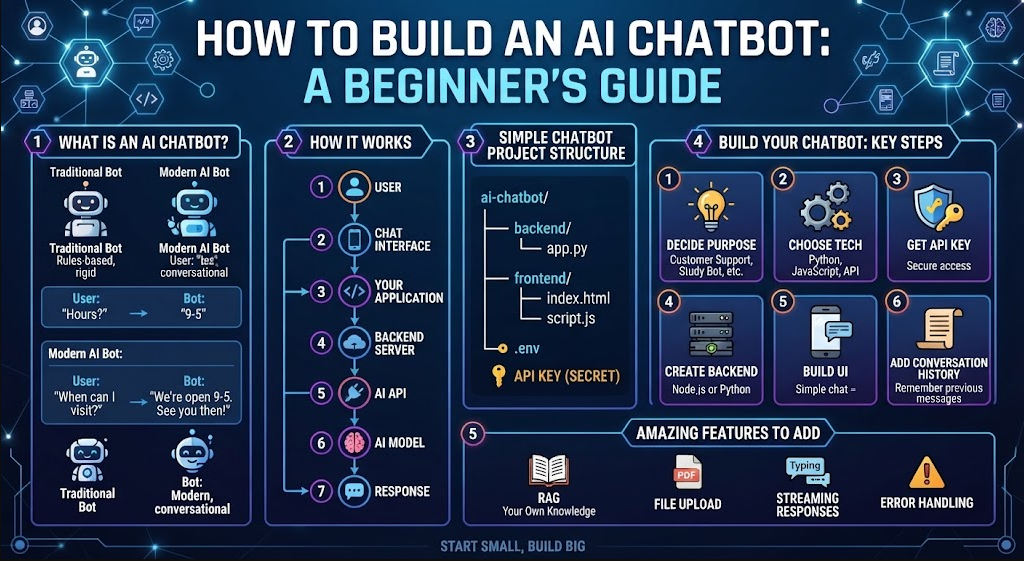
AI chatbots have become one of the most common applications of artificial intelligence. They can answer questions, help customers, explain information, generate content, and assist users with everyday tasks.
The good news is that you do not need to train your own large language model to build an AI chatbot.
You can create a basic chatbot by connecting an existing AI model to a website, mobile app, or desktop application.
In this guide, you will learn how AI chatbots work, what you need to build one, how APIs are used, how to create a simple chatbot, and how you can improve it into a real application.
What Is an AI Chatbot?
An AI chatbot is a software application that communicates with users using natural language.
Traditional chatbots often depend on predefined rules.
For example:
User: What are your opening hours?

Bot: We are open from 9 AM to 5 PM.
A modern AI chatbot can understand a much wider range of questions.
For example:
User: I need to visit your office tomorrow.
What time should I arrive?

AI: Our office is open from 9 AM to 5 PM.
If you are planning to visit tomorrow,
arriving during those hours should be fine.
Instead of responding only to exact phrases, an AI chatbot can use a language model to understand the user’s request and generate a response.
How Does an AI Chatbot Work?
A basic AI chatbot has several important components.
User
  ↓
Chat Interface
  ↓
Your Application
  ↓
Backend Server
  ↓
AI API
  ↓
AI Model
  ↓
Response
  ↓
User
The user sends a message through your application.
Your application sends the message to your backend.
The backend communicates with an AI API.
The AI model processes the request and generates a response.
The response is then sent back to the application and displayed to the user.
Do You Need to Train an AI Model?
Usually, no.
Training a large language model from scratch requires enormous amounts of data, computing resources, and specialized knowledge.
For a beginner project, you can use an existing AI model through an API.
This allows you to focus on building the chatbot itself.
You can later add your own data, documents, database, business information, or custom logic.
What Do You Need to Build an AI Chatbot?
You need several basic components.
| Component | Purpose |
|---|---|
| Programming language | Builds the application |
| AI model/API | Generates responses |
| Backend | Communicates securely with the AI service |
| Frontend | Provides the chat interface |
| Database | Stores users and conversations |
| Hosting | Makes the application available online |
Popular programming choices include Python, JavaScript, TypeScript, and Dart.
Python is particularly useful for beginners because it has a large ecosystem for AI and web development.
Step 1: Decide What Your Chatbot Will Do
Before writing code, decide what problem your chatbot should solve.
Avoid trying to build a chatbot that can do everything.
Start with one specific purpose.
For example:
Customer Support Chatbot
Answers questions about a company’s products and services.
Study Chatbot
Explains lessons and helps students understand difficult topics.
Website Assistant
Answers questions about information published on a website.
Programming Assistant
Helps users understand programming concepts and code.
Business Assistant
Helps employees find information and complete common tasks.
Personal Assistant
Helps users organize information, generate text, and answer questions.
A focused chatbot is easier to develop and test.
Step 2: Choose Your Technology
You can build your chatbot using different technology stacks.
For example:
| Part | Example Technologies |
|---|---|
| Frontend | HTML, CSS, JavaScript |
| Frontend framework | React, Vue |
| Backend | Python, Node.js |
| Mobile | Flutter, React Native |
| Database | PostgreSQL, MySQL, SQLite |
| AI | AI API |
| Hosting | Cloud server or hosting platform |
For a first project, you could use Python for the backend and a simple HTML/JavaScript interface.
Step 3: Create Your Project
A simple project might look like this:
ai-chatbot/
│
├── backend/
│   └── app.py
│
├── frontend/
│   ├── index.html
│   ├── style.css
│   └── script.js
│
└── .env
The frontend handles the user interface.
The backend communicates with the AI service.
The .env file can contain private configuration values such as API credentials.
Step 4: Get an AI API
To generate intelligent responses, your chatbot needs access to an AI model.
Many AI providers offer APIs.
The general process is:
Create account
      ↓
Create API key
      ↓
Configure your application
      ↓
Send requests
      ↓
Receive AI responses
The exact API code depends on the provider you choose.
You should always check the provider’s current API documentation because available models, SDKs, request formats, and pricing can change.
Step 5: Protect Your API Key
Never put a private API key directly inside public frontend code.
For example, avoid:
const API_KEY = "your-secret-key";
inside JavaScript that is sent to the user’s browser.
A safer structure is:
Browser
   ↓
Your Backend
   ↓
AI API
The private API key stays on the server.
For a mobile application, the same principle applies:
Mobile App
    ↓
Your Backend
    ↓
AI Provider
This is an important difference between a quick experiment and a production application.
Step 6: Create the Backend
Your backend receives the user’s message and sends it to the AI service.
Conceptually, the process looks like this:
user_message = get_message()

ai_response = send_to_ai(
    user_message
)

return ai_response
The real implementation will include authentication, the provider’s API format, error handling, and response processing.
Your backend might expose an endpoint such as:
POST /api/chat
The frontend sends:
{
  "message": "Explain machine learning simply."
}
The backend sends the request to the AI model.
It then returns something like:
{
  "reply": "Machine learning is a way for computers to learn patterns from data..."
}
Step 7: Build the Chat Interface
The frontend can be very simple.
For example:
-----------------------------------------
             AI Assistant
-----------------------------------------

AI:
Hello! How can I help you?

You:
[ What is machine learning? ]

              [ Send ]

AI:
Machine learning is a type of AI
that allows computers to learn from
data and identify patterns.
-----------------------------------------
You can later add message bubbles, animations, dark mode, file uploads, voice input, and other features.
Step 8: Send User Messages
When the user clicks the Send button, JavaScript can send the message to your backend.
Conceptually:
fetch("/api/chat", {
    method: "POST",
    body: JSON.stringify({
        message: userMessage
    })
});
The backend processes the request and returns the AI response.
Your JavaScript then adds the response to the chat window.
Step 9: Give Your Chatbot Instructions
A chatbot needs instructions that define how it should behave.
For example:
You are a helpful study assistant.

Explain difficult topics using simple English.
Use examples when useful.
Do not make up information.
If you are unsure, say that you are unsure.
Keep answers concise unless the user requests more detail.
These instructions help establish the chatbot’s behavior.
You can create different instructions for different applications.
For example, a customer-support chatbot might be instructed to answer questions only using company information.
A programming chatbot could be instructed to explain code step by step.
Step 10: Add Conversation History
A chatbot becomes much more useful when it remembers the current conversation.
For example:
User:
What is Python?

AI:
Python is a programming language...

User:
What can I use it for?

AI:
You can use Python for web development,
data analysis, automation, AI, and more.
The second question makes sense because the chatbot has access to the previous conversation.
Without conversation history, the chatbot might not know what “it” refers to.
A basic conversation can be represented as:
[
  {
    "role": "user",
    "content": "What is Python?"
  },
  {
    "role": "assistant",
    "content": "Python is a programming language..."
  },
  {
    "role": "user",
    "content": "What can I use it for?"
  }
]
Your backend can send the relevant conversation history along with the latest message.
Step 11: Store Conversations
If you want users to return to previous conversations, you need a database.
A simple database structure could contain:
| Field | Example |
|---|---|
| user_id | 1024 |
| conversation_id | 5001 |
| message | What is Python? |
| role | user |
| created_at | 2026-10-02 |
You can use databases such as:
- SQLite
- MySQL
- PostgreSQL
- MongoDB
- Firebase
For a small project, SQLite can be enough.
For a larger application with many users, a server database is usually more appropriate.
Step 12: Add Your Own Knowledge
One of the most useful improvements is allowing your chatbot to answer questions using your own information.
For example, imagine you have a company website containing:
- Product information
- Prices
- Support documentation
- Frequently asked questions
- Company policies
You could build a chatbot that uses this information when answering questions.
A common approach is called Retrieval-Augmented Generation, or RAG.
The simplified process is:
User Question
      ↓
Search Your Knowledge
      ↓
Find Relevant Information
      ↓
Send Information + Question
      ↓
AI Model
      ↓
Answer
This can be much more useful than relying only on the model’s general knowledge.
Step 13: Add File Uploads
You can make the chatbot more useful by allowing users to upload documents.
For example:
Upload PDF
    ↓
Extract text
    ↓
Process document
    ↓
Store/search information
    ↓
Ask questions
    ↓
AI generates answer
This can create applications such as:
- PDF assistants
- Research assistants
- Legal document search tools
- Study assistants
- Business document assistants
- Technical documentation assistants
You should also consider file size, privacy, security, and supported file types.
Step 14: Add Streaming Responses
A normal chatbot might wait until the complete answer has been generated before displaying anything.
Streaming allows the response to appear gradually.
Instead of:
Please wait...

[Several seconds]

Complete answer appears.
the user sees:
Machine learning is...
Machine learning is a method...
Machine learning is a method that...
This can make the application feel faster and more responsive.
The exact implementation depends on the AI provider and backend technology.
Step 15: Add Error Handling
Your chatbot should handle failures gracefully.
Possible problems include:
- Invalid API credentials
- Network errors
- API rate limits
- Service outages
- Empty messages
- Very large requests
- Unsupported files
- Database errors
Instead of showing a technical error such as:
HTTP 500 Internal Server Error
you could display:
Sorry, I couldn't process your message.
Please try again.
The detailed technical error can still be recorded in your server logs for debugging.
Step 16: Add Safety Controls
A public AI chatbot needs appropriate safeguards.
Depending on your application, you may need to:
- Validate user input
- Limit request size
- Protect private information
- Prevent unauthorized access
- Rate-limit users
- Monitor unusual activity
- Restrict dangerous or inappropriate use cases
- Keep API credentials secure
You should also avoid presenting AI-generated information as guaranteed fact when accuracy is important.
For applications involving medical, financial, legal, or other high-stakes information, additional safeguards and human review may be necessary.
Step 17: Test Your Chatbot
Testing is an important part of chatbot development.
Try different types of questions.
Simple question
What is Python?
Follow-up question
What can it be used for?
Empty message
Very long message
Test what happens when the user sends a large amount of text.
Unclear question
Tell me about it.
Unexpected input
!@#$%^&
Also test multiple users if your application supports accounts.
Common AI Chatbot Mistakes
Building Everything at Once
Start with a basic chatbot before adding RAG, voice, file uploads, accounts, payments, and other advanced features.
Exposing API Keys
Keep private credentials on the backend.
Sending Too Much Conversation History
Large conversations can increase processing requirements and may affect response quality or cost.
Keep only the relevant context when appropriate.
Trusting AI Answers Blindly
AI models can make mistakes.
For important applications, provide ways to verify information.
Ignoring Costs
API usage can increase as the number of users and messages grows.
Monitor usage and understand the provider’s current pricing and limits.
Not Limiting Users
A public chatbot can receive automated or abusive requests.
Rate limiting and authentication can help protect your service.
Beginner AI Chatbot Project Ideas
Once you understand the basics, you can build more specialized applications.
| Project | Main Feature |
|---|---|
| AI Study Chatbot | Explain lessons |
| AI Customer Support Bot | Answer product questions |
| AI PDF Chatbot | Ask questions about documents |
| AI Coding Assistant | Explain and generate code |
| AI Travel Assistant | Help plan trips |
| AI Language Tutor | Practice languages |
| AI Writing Assistant | Create and edit text |
| AI Business Assistant | Answer company questions |
| AI Website Assistant | Answer visitor questions |
| AI Research Assistant | Search and summarize information |
A Simple AI Chatbot Development Roadmap
If you are completely new to chatbot development, follow this order:
Step 1: Learn Programming
Start with Python, JavaScript, TypeScript, or another suitable language.
Step 2: Learn APIs
Understand:
- HTTP
- JSON
- REST APIs
- Authentication
- Requests
- Responses
Step 3: Connect an AI Model
Create a small program that sends a message and receives a response.
Step 4: Build a Chat Interface
Create a simple web, mobile, or desktop interface.
Step 5: Add Conversation History
Allow the chatbot to understand previous messages.
Step 6: Add a Database
Store users and conversations if needed.
Step 7: Add Your Own Knowledge
Learn retrieval and RAG techniques when your chatbot needs to work with custom information.
Step 8: Secure the Application
Protect API keys, user information, endpoints, and databases.
Step 9: Test
Test normal, unusual, large, and unexpected inputs.
Step 10: Deploy
Publish your application and monitor how it performs.
Final Thoughts
Building an AI chatbot is one of the best ways to learn practical AI application development.
You do not need to create a large language model yourself. You can start by connecting an existing AI model to a simple application.
Start with a basic chatbot that accepts a message and returns an answer.
Then gradually add conversation history, a database, your own knowledge, file uploads, streaming responses, authentication, and other features.
The basic concept remains simple:
User → Your App → Backend → AI Model → Response → User
Once you understand this architecture, you can use the same ideas to build AI assistants for websites, mobile apps, businesses, education, customer support, and many other applications.