
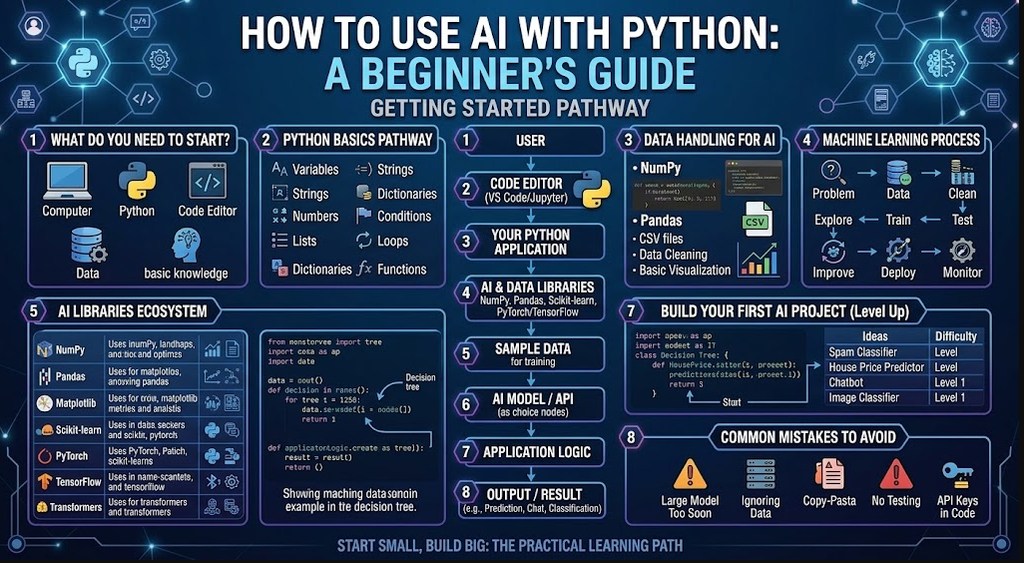
Python is one of the most popular programming languages for artificial intelligence and machine learning. It is relatively easy to learn, has a large community, and provides many libraries that make it possible to build AI-powered applications without creating everything from scratch.
You can use Python and AI to analyze data, recognize images, process text, build chatbots, make predictions, automate tasks, and create intelligent applications.
This guide explains how beginners can get started with AI using Python.
What Is Python?
Python is a general-purpose programming language known for its simple syntax and extensive collection of libraries.
It is commonly used for:
- Web development
- Data analysis
- Automation
- Software development
- Machine learning
- Artificial intelligence
- Scientific computing
- Data visualization
For AI development, Python is especially useful because many popular AI and machine learning libraries support it.
Why Is Python Popular for AI?
Python makes AI development easier because developers can use existing libraries instead of implementing every algorithm from the beginning.
Some important advantages include:
| Feature | Benefit |
|---|---|
| Simple syntax | Easier for beginners to learn |
| Large ecosystem | Many AI and data libraries are available |
| Community | Large number of tutorials and developers |
| Flexibility | Suitable for many types of applications |
| Data support | Excellent tools for processing data |
| AI libraries | Many frameworks support Python |
Python can be used for both small experiments and large AI applications.
What Do You Need to Start?
You don’t need an expensive computer to learn the basics of AI with Python.
A beginner generally needs:
- A computer
- Python
- A code editor
- Basic Python knowledge
- An AI or machine learning library
- Sample data for experiments
You can write Python using editors such as Visual Studio Code, PyCharm, or Jupyter Notebook.
Step 1: Install Python
First, install Python on your computer.
After installation, open a terminal or command prompt and check whether Python is working.
python --version
Depending on your operating system, you may need:
python3 --version
If Python is installed correctly, the command should display the installed version.
Step 2: Learn Basic Python
Before jumping into machine learning, learn the fundamentals of Python.
Important concepts include:
- Variables
- Strings
- Numbers
- Lists
- Dictionaries
- Conditions
- Loops
- Functions
- Classes
- Modules
- File handling
- Error handling
For example:
name = "Python"

print("Hello " + name)
You should become comfortable reading and writing simple Python programs before moving into more advanced AI projects.
Step 3: Install AI and Data Libraries
Python has many libraries that can help with AI development.
Some commonly used libraries include:
| Library | Common Use |
|---|---|
| NumPy | Numerical computing |
| Pandas | Data processing |
| Matplotlib | Data visualization |
| Scikit-learn | Machine learning |
| PyTorch | Machine learning and deep learning |
| TensorFlow | Machine learning and deep learning |
| Transformers | Working with many modern language and AI models |
You can install a Python package using pip.
For example:
pip install numpy pandas scikit-learn
The libraries you need will depend on the type of AI application you want to build.
Step 4: Start With Machine Learning
Machine learning is a major area of artificial intelligence.
Instead of programming every rule manually, you provide an algorithm with data so it can learn patterns from that data.
For example, imagine you want to predict whether a customer might purchase a product.
You could provide information such as:
- Customer age
- Previous purchases
- Website visits
- Time spent on the website
A machine learning model can learn patterns from existing examples and make predictions for new data.
Step 5: Build a Simple Machine Learning Example
One of the easiest ways to understand AI with Python is to build a small classification model.
The following example uses Scikit-learn:
from sklearn.tree import DecisionTreeClassifier

# Training data
X = [
    [20, 1],
    [25, 1],
    [30, 0],
    [35, 0],
    [40, 0]
]

# Labels
y = [
    1,
    1,
    1,
    0,
    0
]

model = DecisionTreeClassifier()

model.fit(X, y)

prediction = model.predict([[28, 1]])

print(prediction)
This example trains a simple decision tree using sample data and then asks the model to make a prediction.
The data in this example is intentionally simple. Real-world machine learning projects require larger datasets, appropriate features, testing, and careful evaluation.
Step 6: Work With Data
Good AI applications usually depend on good data.
Python provides powerful tools for working with datasets.
For example, Pandas can load and analyze CSV files:
import pandas as pd

data = pd.read_csv("data.csv")

print(data.head())
You can then inspect columns, remove missing values, filter records, calculate statistics, and prepare the data for machine learning.
Data preparation is often one of the most important parts of a machine learning project.
Step 7: Create an AI Text Application
Python can also work with language models and other text-processing systems.
Possible applications include:
- Chatbots
- Text summarizers
- Document search
- Question-answering systems
- Text classification
- Sentiment analysis
- Translation tools
- Content analysis
The exact Python code depends on the AI model or service you choose.
Many modern AI systems can be accessed through libraries or APIs.
Step 8: Build an AI Chatbot
A basic AI chatbot can combine Python with a language model.
A typical architecture looks like this:
User
  ↓
Python Application
  ↓
AI Model
  ↓
Generated Response
  ↓
User
Python can handle the application logic, user input, conversation history, authentication, databases, and connection to the AI model.
For a more advanced chatbot, you can also add:
- Document search
- Database access
- Voice input
- Voice output
- User accounts
- Conversation history
- Web applications
Step 9: Use AI for Image Recognition
Python can also be used to build applications that work with images.
Examples include:
- Object detection
- Image classification
- Face detection
- Image segmentation
- Image search
- Image quality analysis
Libraries and frameworks such as PyTorch and TensorFlow provide tools for developing deep learning applications.
For beginners, it is usually easier to start with an existing trained model rather than training a large model from scratch.
Step 10: Connect Python to AI APIs
Another beginner-friendly approach is using Python to communicate with an existing AI service.
The general process is:
Python
   ↓
API Request
   ↓
AI Service
   ↓
API Response
   ↓
Python Application
Your Python application can send information to the service and receive a response.
For example, a website could send a customer’s question to an AI system and display the resulting answer.
Always protect API keys and never place private credentials directly inside publicly shared source code.
Step 11: Build a Small AI Project
The best way to learn is by building projects.
Here are some beginner project ideas:
| Project | Difficulty |
|---|---|
| Spam message classifier | Beginner |
| House price predictor | Beginner |
| Movie recommendation system | Beginner |
| Sentiment analyzer | Beginner |
| Image classifier | Intermediate |
| AI chatbot | Intermediate |
| Document question-answering app | Intermediate |
| Recommendation engine | Intermediate |
| AI-powered web application | Advanced |
| Custom machine learning system | Advanced |
Start with a small project and gradually increase the complexity.
Python and AI Project Workflow
A typical AI project can follow this process:
Define Problem → Collect Data → Clean Data → Explore Data → Train Model → Test Model → Improve Model → Build Application → Deploy → Monitor
Not every AI project needs every step in exactly the same way, but this provides a useful starting structure.
How to Learn Python for AI
If you are completely new to programming, don’t try to learn every AI technology immediately.
A practical learning path is:
Stage 1: Python Basics
Learn:
- Variables
- Data types
- Conditions
- Loops
- Functions
- Lists and dictionaries
- Classes
Stage 2: Data Handling
Learn:
- NumPy
- Pandas
- CSV files
- Data cleaning
- Basic visualization
Stage 3: Machine Learning
Learn:
- Training data
- Features
- Labels
- Classification
- Regression
- Model evaluation
- Overfitting
Stage 4: AI Applications
Learn how to build:
- Chatbots
- Recommendation systems
- Image applications
- Text-processing applications
Stage 5: Deployment
Finally, learn how to turn your Python AI project into an application that other people can use.
You can explore:
- Web applications
- APIs
- Cloud platforms
- Containers
- Databases
Common Mistakes Beginners Make
Trying to Build a Huge AI Model Immediately
Large AI models can require substantial computing resources and specialized knowledge.
Start with small models and existing tools.
Ignoring the Data
A machine learning model cannot magically fix poor-quality data. Spend time understanding and preparing your dataset.
Copying Code Without Understanding It
Code examples are useful for learning, but try to understand what each part does.
Not Testing the Model
A model that works on training data may not perform well on new data.
Always evaluate your model using appropriate test data.
Putting API Keys in Source Code
Never publish private API keys in GitHub repositories or client-side applications.
Use environment variables or a secure secrets-management system.
What Can You Build With Python and AI?
Once you understand the basics, the possibilities are extensive.
You could build:
- AI chatbots
- Smart search systems
- Recommendation engines
- Personal assistants
- Fraud detection systems
- Document analysis tools
- Image recognition applications
- Voice applications
- Business automation systems
- AI-powered websites
- Data prediction tools
- Educational applications
The best project depends on the problem you want to solve.
Final Thoughts
Python is an excellent starting point for learning artificial intelligence because it combines beginner-friendly syntax with a large ecosystem of AI, machine learning, and data-processing tools.
You don’t need to start by building a complicated AI system. Begin with Python fundamentals, learn how to work with data, build a small machine learning project, and then explore more advanced AI applications.
The most important part is practice. Build small projects, understand the code, experiment with different datasets, and gradually move toward larger applications.
With Python and AI, you can eventually create everything from simple prediction tools to complete AI-powered applications.
Frequently Asked Questions
Is Python good for AI beginners?
Yes. Python has relatively simple syntax and a large ecosystem of libraries for data science, machine learning, and AI development.
Do I need advanced mathematics to use AI with Python?
Basic AI projects can be started without advanced mathematics. However, learning concepts from statistics, probability, linear algebra, and calculus becomes increasingly useful as you move into advanced machine learning and deep learning.
Can I build an AI chatbot with Python?
Yes. Python can be used to build chatbot applications that connect to language models, databases, APIs, and other services.
Can Python be used for generative AI?
Yes. Python is widely used to build applications around generative AI models, including applications that work with text, images, audio, and other types of content.
Is Python free?
Yes. Python is open-source and can be downloaded and used without purchasing a programming-language license.
Should I learn Python before machine learning?
Learning Python fundamentals first is strongly recommended. You don’t need to master every part of Python, but you should be comfortable writing and understanding basic programs before learning machine learning.
Can I use AI to help me learn Python?
Yes. AI tools can explain Python concepts, help identify programming errors, generate practice exercises, and explain code. You should still understand and test the code rather than relying on generated code without checking it.